SpeakDo Field
The person talks, SpeakDo acts.
Dictate a note, prepare a job, log time spent, look up a client or add a task — from your phone, without opening your ERP's full interface. You check the proposal, your ERP carries it out with your rights.
SpeakDo Field is available today through the Dolibarr module, free and under the GNU GPL license · Full solution from €84 excl. VAT/year · No card required to try
Installable PWA, no app store
No AI key to configure
Rights managed by your ERP
Minimized data
The problem isn't wasted time
It's what never makes it into the ERP.
A technician who says "Job finished at Dupont's. Router replaced, an hour and a half." has just produced a complete piece of information. Without SpeakDo, that sentence stays spoken: it only exists for the ERP if someone reopens several screens that evening to retype it. Plenty of job reports, time entries and tasks are, in practice, never entered at all.
Business use cases, not a general chatbot
The things that always wait can now be done on the spot.
SpeakDo is built for tradespeople, technicians, mobile sales staff and small teams who use their ERP out in the field.
Instant job reports
Add a note or draft a report while the job is still fresh in your mind.
"Add to the file: router replaced, VPN test passed, plan to replace the UPS."
Tasks and follow-ups
Turn an intention into a dated task, attached to the right client or the right file.
"Create a task to call Dupont back Friday morning about the quote."
Jobs prepared in advance
Create a complete job with date, time, title and related tasks in a single request.
"Schedule a job Tuesday at 2pm to replace the switch, and add the task to back up the configuration."
Finding the right context
Look up a client, a quote or the latest useful information without navigating your ERP's full interface.
"Open Toto Informatique and show me the latest jobs."
How it works today
A PWA, activated from your ERP.
SpeakDo Field works today through the Dolibarr module. The full installation walkthrough, with screenshots, is on the SpeakDo for Dolibarr page.
01
A PWA, not an app store install
SpeakDo adds itself to the phone's home screen like an app. No app store, nothing for a mobile administrator to approve.
02
Activation by QR code
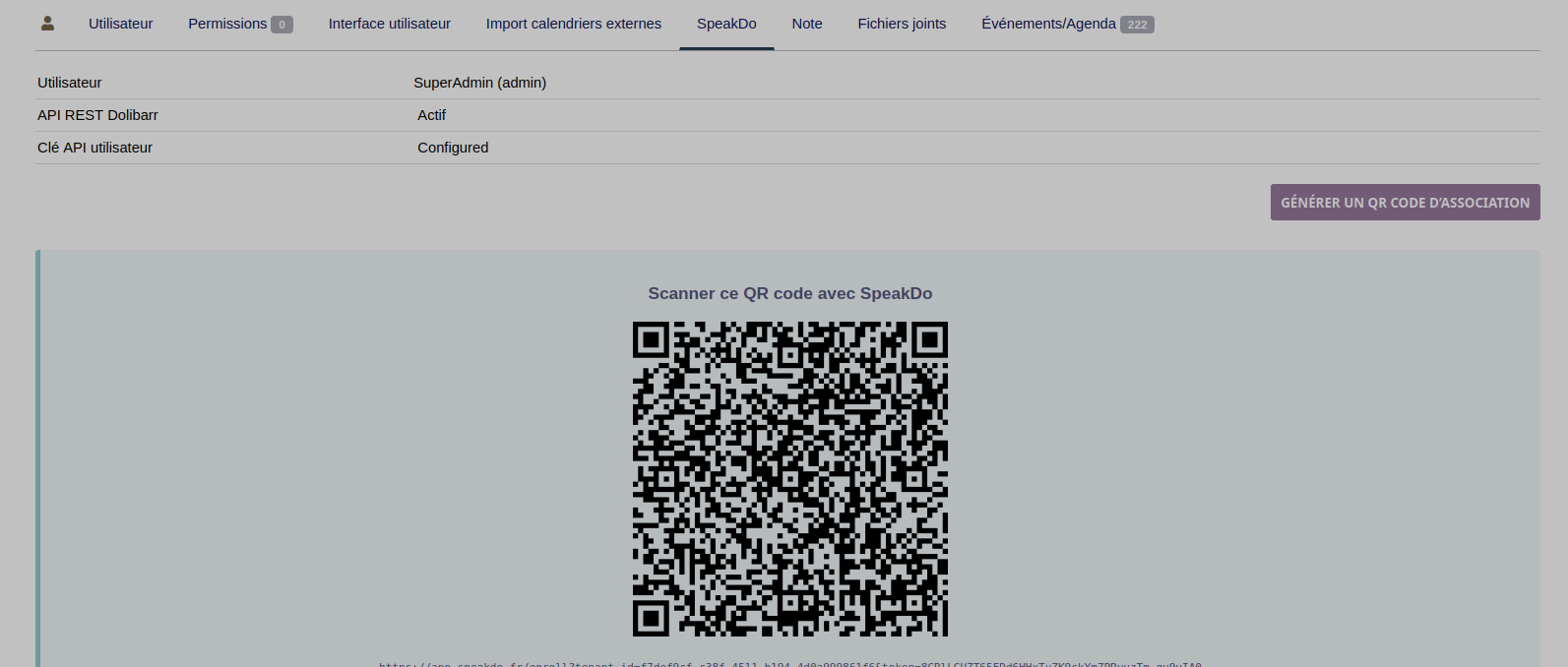
From their Dolibarr user profile, each person scans a QR code to link their phone. No ERP password is ever typed into the PWA.
03
Your Dolibarr rights apply
From the very first use, SpeakDo acts with the Dolibarr rights of the connected person — never more, never less.
Control
SpeakDo doesn't replace your rights or your validations.
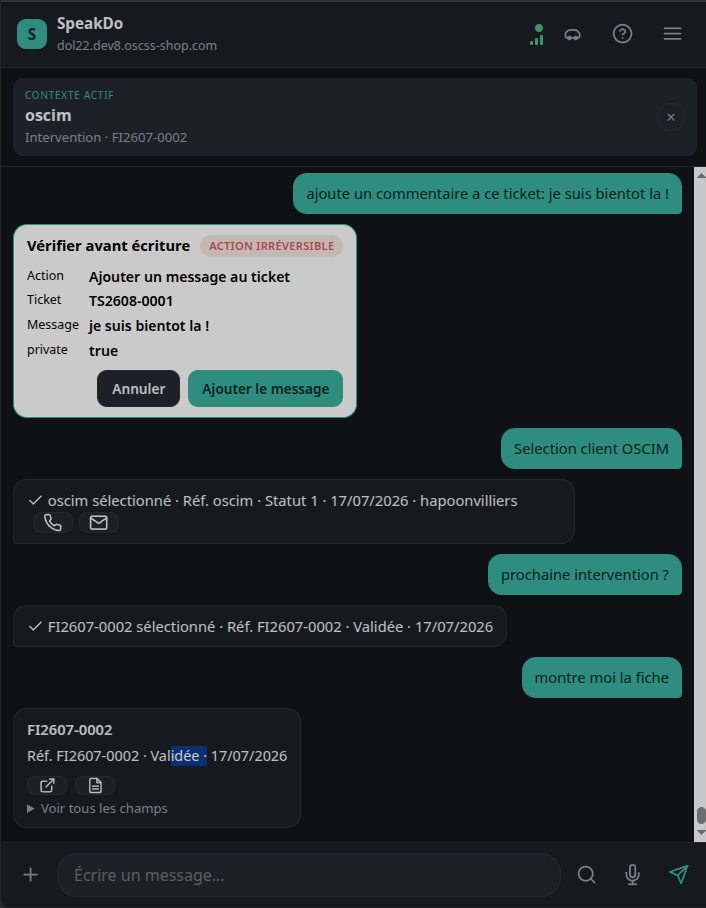
The engine understands the request and prepares a structured proposal. Nothing is written to the ERP without the person having seen it first.
Your ERP keeps the rights — never SpeakDo.
Every action comes from a closed catalog, never free access to the ERP.
A sensitive action is shown for confirmation, never written directly.
Frequently asked questions
Simple to understand.
Full detail on installation and security is on the dedicated pages.
Do I need to install an app?
No. SpeakDo Field is a PWA (Progressive Web App): it's added to the phone's home screen directly from the browser, with no app store involved.
What languages does SpeakDo support?
The website is published in French, English, German, Spanish and Italian. The product itself understands those same languages for the requests users make.
Does SpeakDo Field work without a network connection?
No. SpeakDo needs a connection to transcribe and process your request: it is not an offline mode.
Is it available with ERPs other than Dolibarr?
Not yet in production. SpeakDo is designed as a business layer independent of the ERP, but Dolibarr is currently the only integration actually available. See the Integrations page.
Does SpeakDo replace my ERP?
No. SpeakDo is a complementary field interface. Your ERP remains the source of truth, the authority on rights, and the system that carries out the writes.
How are my rights managed?
SpeakDo uses the rights of the connected Dolibarr user. Someone who cannot view or edit a record in Dolibarr cannot do so through SpeakDo either.
Get started now
The Dolibarr module is free. The trial starts on install.
No payment on this page. Install the module, link your phone, test SpeakDo Field with your real rights.