SpeakDo for Dolibarr
What happens in the field ends up in Dolibarr.
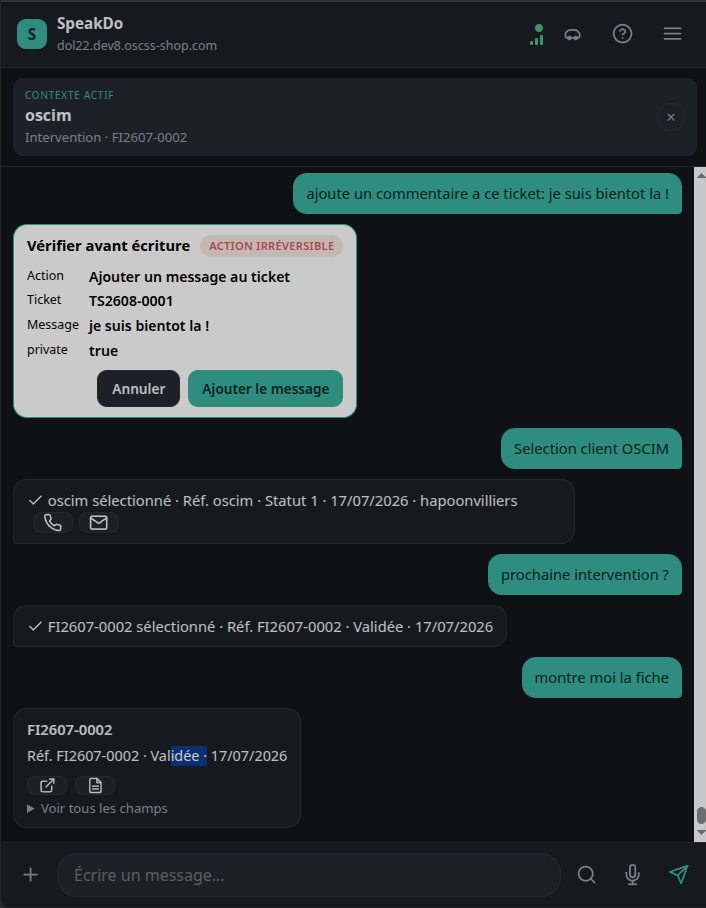
Dictate a note, prepare a service call, add a task or find a customer record from your phone. SpeakDo prepares the action, you check it, Dolibarr executes it with your permissions.
GNU GPL module, free to download · ~45 free actions or 30 days of trial · No card required · Full service from €84 excl. VAT/year
No AI key to configure
Permissions managed by Dolibarr
Minimized data
European providers
Installable PWA
The problem isn't Dolibarr
It's the moment the information gets lost.
Right after a job, between two appointments, or from a parked vehicle, information is still fresh. But it often waits until the evening — then disappears into a notebook, a voice memo, or memory.
Three steps, no AI setup
Install. Scan. Use.
The Dolibarr module is free. Activating it automatically creates your SpeakDo account. Each user then pairs their phone from their Dolibarr profile.
01
Install the module
Activate SpeakDo like any other Dolibarr module. The API and the information needed for your account are checked automatically.
02
Scan the QR code
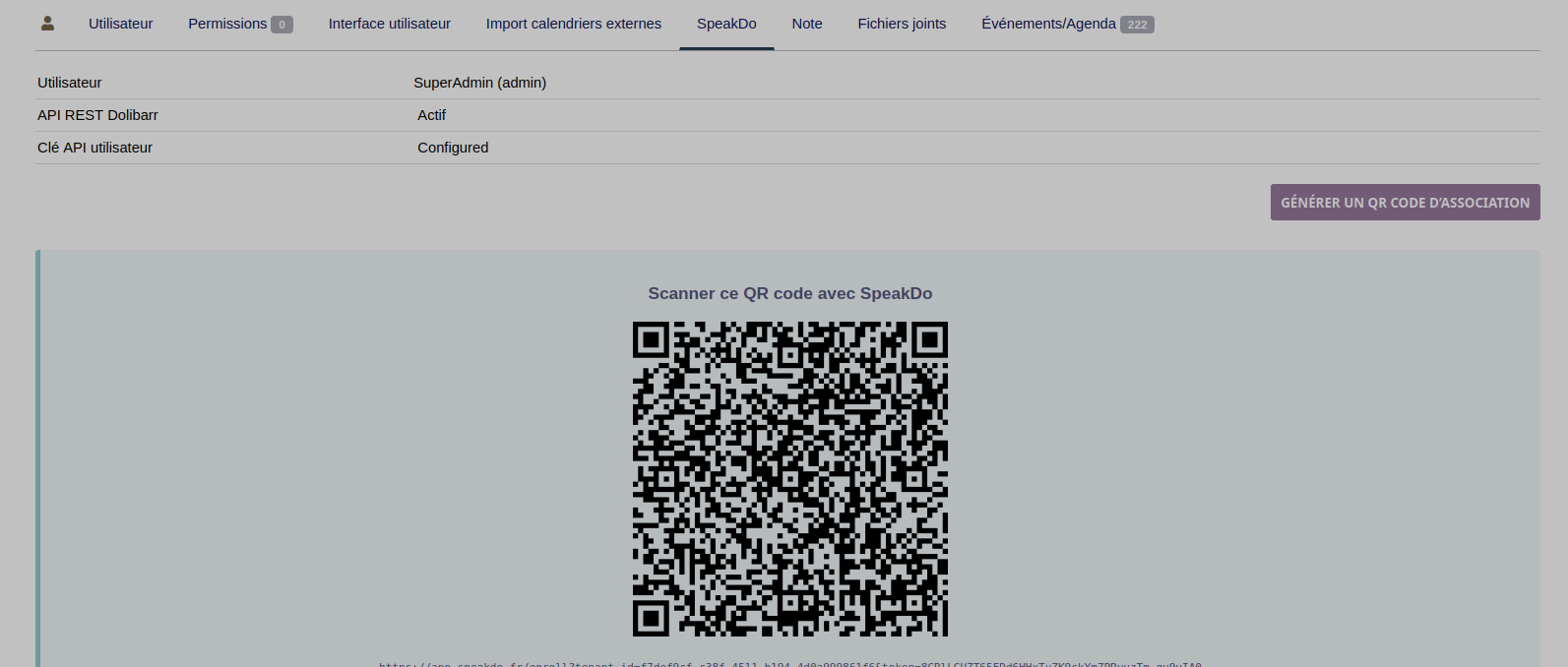
From the SpeakDo tab on the user record, scan the QR code with your phone. No ERP password or API key is ever typed into the PWA.
03
Try it on your own data
The first uses are free. You test SpeakDo in the field with your own customers, service calls and Dolibarr permissions.
Business use cases, not a general-purpose chatbot
The tasks that keep waiting can be done right now.
SpeakDo is built for tradespeople, technicians, mobile sales staff and small teams who use Dolibarr in the field.
Immediate reports
Add a note or draft a report while the job is still fresh.
"Add to the file: router replaced, VPN test passed, plan the UPS replacement."
Tasks and follow-ups
Turn an intent into a dated task, linked to the right customer or file.
"Create a task to call Dupont back Friday morning about the quote."
Prepared service calls
Create a full service call with date, time, title and related tasks in a single request.
"Set up a service call Tuesday at 2pm to replace the switch and add a task to back up the config."
Find the right context
Look up a customer, a quote or the latest useful information without navigating the full Dolibarr interface.
"Open Toto Informatique and show me the latest service calls."
Data control
SpeakDo uses an LLM, but doesn't hand it your Dolibarr.
The language engine is used to understand your request and prepare a structured action. The middleware doesn't forward a copy of Dolibarr: it only selects the context needed for the action at hand.
Context minimized per action
Some actions — notably identifying a company or a contact — apply a minimal selection of allowed fields, excluding free text, attachments, bank details and full history. This minimization is being rolled out progressively across the rest of the catalog.
Example: identifying a company can use its name, reference and city — not its entire record.
European providers
SpeakDo favors European providers for hosting and language processing — notably OVHcloud, with Scaleway as a fallback for some services. Full details are in the privacy policy.
No training on your requests
Under OVHcloud's published commitments for AI Endpoints, submitted content isn't used to train or improve the models. SpeakDo doesn't log full prompts by default.
Dolibarr stays the source of truth
The LLM doesn't decide permissions and can't write freely into the ERP. It proposes an action from a closed catalog; Dolibarr applies the user's real permissions and carries out the write, after confirmation when required.
SpeakDo talks about minimization, not anonymization: some requests naturally need a customer name or an identifiable business detail. The privacy policy details the processing and its purposes. The general mechanism for per-action minimization is described in full on the Security page.
A complete service
No API key. No separate AI subscription. No GPU server.
SpeakDo directly bundles the processing engine, transcription, hosting and updates. You use the service, without administering its infrastructure.
Built-in language engine
Voice transcription included
Automatically updated PWA
Module updates included
Middleware hosting
Annual plan + clearly priced optional top-ups
Everything is already included
- Free Dolibarr module, GNU GPL license
- Ready-to-use service, no provider account to create
- LLM and voice transcription included
- PWA and middleware run for you
- Updates included for the length of the plan
Dolibarr stays in control
SpeakDo doesn't replace your permissions or your approvals.
The engine understands the request and prepares a structured proposal. The user sees the customer, the object, and the planned operations before anything is written.
Permissions are the Dolibarr user's own.
Writes use a closed, versioned catalog of actions.
Every sensitive operation is shown for confirmation.
Phones can be revoked from Dolibarr.
For administrators and integrators
An integration built for Dolibarr — an external module, no core changes.
SpeakDo installs like any other Dolibarr module and relies entirely on its native REST API.
External module installed without modifying Dolibarr's core.
Communicates exclusively through Dolibarr's REST API, with each user's inherited permissions.
Devices are managed and revocable from Dolibarr — revocation is applied within the security window described in the documentation.
Closed, versioned action catalog — never a free write decided by the language model.
Module distributed under the GNU GPL license; installation, compatibility and diagnostic documentation published.
A light annual price
The full service, from €7 a month.
The monthly price is a reference point. The plan is billed annually to keep processing costs down and pricing simple. The daily included volume resets every day. Beyond that, the administrator can buy a one-off top-up from Dolibarr — the price and volume are shown before purchase.
No plan caps the number of users. Choose your plan based on the volume of actions your team needs: credits are shared across all users of the same Dolibarr instance.
€84excl. VAT/year
€7 excl. VAT/month · billed annually
For a solo tradesperson, a manager, or occasional shared use.
- No cap on number of users
- Recommended volume for 1 regular user
- About 7 actions per day on average, shared (LLM and transcription included)
- PWA and updates included
Also works for several occasional users whose combined usage stays within the included volume.
Start for free€168excl. VAT/year
€14 excl. VAT/month · billed annually
For a small team using SpeakDo regularly.
- No cap on number of users
- Recommended volume for about 3 regular users
- About 30 actions per day on average, shared across users of the same Dolibarr instance
- Centralized device management
€288excl. VAT/year
€24 excl. VAT/month · billed annually
For a field team with heavy daily use.
- No cap on number of users
- Recommended volume for about 10 regular users
- About 90 actions per day on average, shared across users of the same Dolibarr instance
- Team administration in Dolibarr
You don't pay before you've tried SpeakDo on your Dolibarr.The free, GNU GPL module automatically creates your SpeakDo account and includes ~45 free actions or 30 days of trial (whichever comes first ends the trial). The subscription is then started from the Dolibarr module.
Download
Get started now
The module is free. The trial starts after installation.
No payment happens on this page. The module automatically links your Dolibarr instance to SpeakDo, then lets you pair phones.
Download and activate the module
The module checks the Dolibarr API, creates your account's technical identity, and retrieves basic company information.
Pair your phone
Open the SpeakDo tab on your user record and scan the temporary QR code.
Use the free first actions
Try voice, text, lookups and writes with your real permissions.
Activate a plan from Dolibarr
Once the trial ends, the module opens a subscription page tied to your account. Legal information is pulled from Dolibarr for billing.
Frequently asked questions
Simple to install. Simple to understand.
Today, SpeakDo for Dolibarr is a self-contained service, built specifically for this ERP.
Is the Dolibarr module really free?
Yes: the Dolibarr module, distributed under the GNU GPL license, is free to download. It connects your Dolibarr to SpeakDo, automatically creates your account, pairs phones and shows service status. The SpeakDo service (voice and language processing, hosting) becomes paid after the trial — ~45 free actions or 30 days, whichever limit is reached first.
Can I install SpeakDo from DoliStore, or view its source code?
Yes. The module is also listed on DoliStore, the official Dolibarr module marketplace (the listing itself offers a language switcher, including English). The repository is also public on GitHub, where you can review the source code, follow the project, or install it manually. The direct download on this page remains the fastest way to always get the latest version.
What is an "action"?
The volume actually consumed is measured in tokens (the technical unit of language processing), never cut off abruptly on the Nth attempt. "Action" is an indicative equivalent (about 33,000 tokens on average, including dictation and transcription) shown to keep things readable — not a contractual guarantee or a turn-by-turn counter. Confirmations, cancellations and local lookups consume no tokens. The real balance (tokens and action equivalent) is shown in the module before any use and before any purchase.
Do I need an OpenAI or OVH account, or to run Ollama?
No. The processing engine and transcription are already built into the SpeakDo service. No API key and no GPU server are required.
Why an annual plan rather than a one-time purchase?
SpeakDo includes a PWA, a middleware, voice and language processing, hosting, and ongoing updates. The plan funds a maintained service, rather than a promise of lifetime compatibility with no recurring revenue.
What information is sent to the language engine?
Only the context needed for the current request. Some actions (identifying a company or a contact) already apply a minimal selection of allowed fields; this per-action minimization is being rolled out progressively across the rest of the catalog. SpeakDo doesn't forward a copy of your Dolibarr or full records when they aren't needed.
Where is processing done?
SpeakDo favors European providers, notably OVHcloud and Scaleway depending on the services activated. Details on the processing actually used are in the privacy policy.
Is my data used to train a model?
No. Under OVHcloud's published commitments for AI Endpoints, submitted content isn't used to train or improve the models.
How are permissions handled?
SpeakDo uses each Dolibarr user's own permissions. A user who can't view or edit an object in Dolibarr can't do it through SpeakDo either.
Where does payment happen?
Never on this page, nor in daily field use. Once the free uses run out, the administrator opens a subscription page tied to their account from the Dolibarr module.
How am I informed about updates?
The SpeakDo dashboard in Dolibarr can show service status, module version, news, the changelog, maintenance windows and plan information.
Does installation require support?
No. SpeakDo is designed for a self-service journey: install the module, activate it, scan the QR code, and start using it. No manual configuration of the language engine is needed.
Does SpeakDo replace Dolibarr?
No. SpeakDo is a complementary field interface. Dolibarr stays the source of truth, the authority on permissions, and the system that carries out the writes.
Under what license is SpeakDo distributed?
The SpeakDo module for Dolibarr is distributed under the GNU GPL license: it can be downloaded, audited, modified and redistributed under that license's terms. This license covers only the module installed in Dolibarr — the SpeakDo application, APIs, middleware and hosted services are offered separately, under the SpeakDo service terms.
Is SpeakDo an official Dolibarr module?
SpeakDo is an independent product designed to work with Dolibarr. It is not published by the Dolibarr association.
Does SpeakDo work with ERPs other than Dolibarr?
Not yet in production. SpeakDo is architected as a business layer independent of the ERP, but Dolibarr is currently the only integration actually available. See the Integrations page.